
![[Day #18 Pyats Series] Building test case hierarchy with Section, CommonSetup using pyATS for Cisco](https://networkjourney.com/wp-content/uploads/2025/07/Building-test-case-hierarchy-with-Section-CommonSetup-using-pyATS-for-Cisco.png)
Trainer Sagar Dhawan
- Posted on
[Day #18 Pyats Series] Building test case hierarchy with Section, CommonSetup using pyATS for Cisco [Python for Network Engineer]
Table of Contents
Introduction on the Key Points
Welcome to Day 18 of the 101 Days of pyATS (Vendor-Agnostic) series!
Today, we’re stepping into a foundational topic that defines how you structure your test cases in pyATS using CommonSetup, CommonCleanup, and the powerful Section object. These aren’t just buzzwords—they are essential components that bring scalability and modularity to your automation scripts.
In traditional scripting, code is often written linearly, making it hard to reuse or conditionally execute logic. But pyATS, being a test framework built by Cisco, introduces object-oriented testing via AEtest—which is deeply powerful when used the right way.
If you’re learning Python for Network Engineer roles, mastering this structure will enable you to build test automation that’s reusable, maintainable, and production-ready.
By the end of this article, you’ll know:
- What
CommonSetupandCommonCleanupare - How
Sectionhelps in dynamically defining steps - How to build a complete test hierarchy for your Cisco infrastructure
- How to reuse test logic across different devices and test plans
Topology Overview
To keep things simple, our testbed contains two Cisco IOS-XE routers connected to each other. You can simulate this setup in EVE-NG, GNS3, or Cisco DevNet Sandboxes.
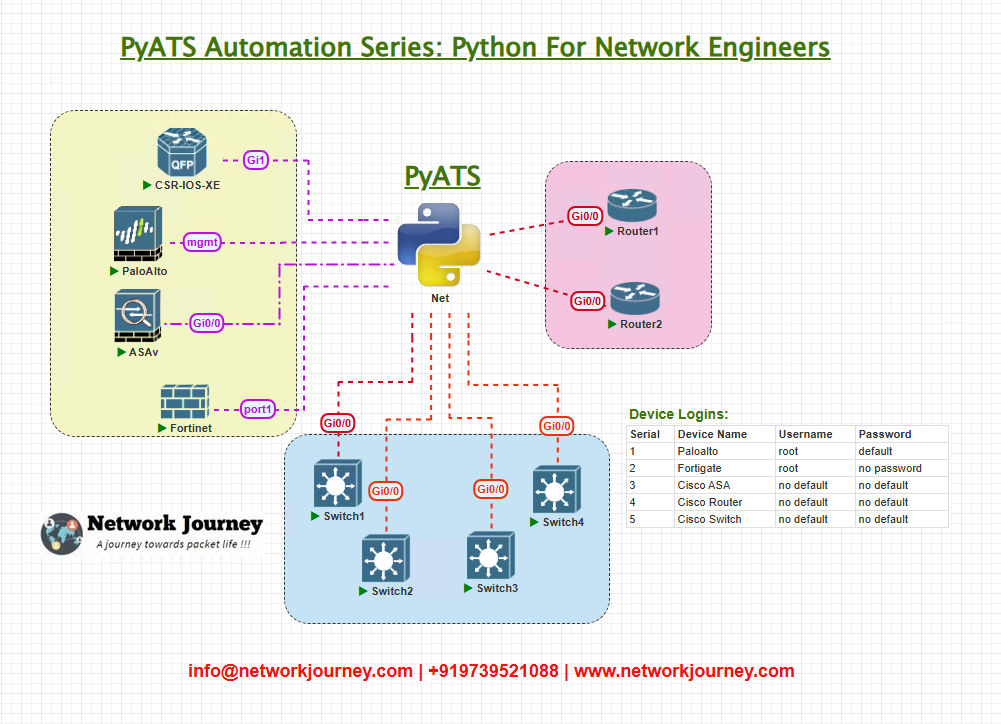
Both devices are reachable via SSH, and the pyATS script will:
- Perform device connectivity verification
- Parse version info
- Check interface status
- Validate logical connectivity using
ping
Topology & Communications
| Component | Detail |
|---|---|
| Devices | Cisco IOS-XE Routers (R1, R2) |
| Access | SSH |
| Port | 22 |
| Authentication | Username / Password |
| pyATS Features Used | AEtest, Section, CommonSetup, Testcase inheritance, Device connection/disconnection |
Workflow Script: test_hierarchy.py
#!/usr/bin/env python3

from pyats import aetest
from genie.testbed import load

# Load the testbed
testbed = load('testbed.yml')

# Global device variables
R1 = testbed.devices['R1']
R2 = testbed.devices['R2']

# === TEST CASE STRUCTURE ===

class CommonSetup(aetest.CommonSetup):

    @aetest.subsection
    def connect_devices(self):
        R1.connect(log_stdout=False)
        R2.connect(log_stdout=False)

    @aetest.subsection
    def validate_connectivity(self):
        assert R1.connected, "R1 connection failed"
        assert R2.connected, "R2 connection failed"

# === ACTUAL TEST CASES ===

class VersionCheck(aetest.Testcase):

    @aetest.setup
    def setup(self):
        self.section1 = aetest.Section(parent=self, name='Check Version on R1')
        self.section2 = aetest.Section(parent=self, name='Check Version on R2')

    @aetest.test
    def run_section1(self):
        output = R1.parse('show version')
        self.section1.parameters['version'] = output['version']['version']
        print(f"R1 Version: {output['version']['version']}")

    @aetest.test
    def run_section2(self):
        output = R2.parse('show version')
        self.section2.parameters['version'] = output['version']['version']
        print(f"R2 Version: {output['version']['version']}")

class InterfaceCheck(aetest.Testcase):

    @aetest.test
    def check_interfaces(self):
        r1_intf = R1.parse('show ip interface brief')
        r2_intf = R2.parse('show ip interface brief')
        print("R1 Interfaces:")
        for intf, val in r1_intf['interface'].items():
            print(f"{intf}: {val['ip_address']} - {val['status']}")

        print("R2 Interfaces:")
        for intf, val in r2_intf['interface'].items():
            print(f"{intf}: {val['ip_address']} - {val['status']}")

class CommonCleanup(aetest.CommonCleanup):

    @aetest.subsection
    def disconnect_devices(self):
        R1.disconnect()
        R2.disconnect()
Explanation by Line
CommonSetup
→ Use it for shared setup activities like device connection. This is run before any testcases.@aetest.subsection
→ Divides setup or cleanup into smaller logical blocks.R1.connect()
→ Connects to the device using SSH. Output is suppressed for cleaner logs.assert R1.connected
→ Validates the connection; if false, test halts immediately.Section()
→ Creates nested logical sections within testcases. You can dynamically group steps, add logs, or use them for conditional test flows.VersionCheckandInterfaceCheck
→ Independent testcases that demonstrate version parsing and interface validation.CommonCleanup
→ Automatically disconnects the devices after test completion, ensuring clean state.
Sample testbed.yml
testbed:
  name: basic_lab
  credentials:
    default:
      username: admin
      password: cisco123
  devices:
    R1:
      os: iosxe
      type: router
      connections:
        cli:
          protocol: ssh
          ip: 192.168.100.10
    R2:
      os: iosxe
      type: router
      connections:
        cli:
          protocol: ssh
          ip: 192.168.100.11
Pro Tip: Make sure SSH is reachable and that your terminal or VM can ping both IPs before running pyATS scripts.
Post-validation CLI Screenshots
Sample Console Output:
Connecting to R1... Success
Connecting to R2... Success

R1 Version: 17.09.04
R2 Version: 16.12.05

R1 Interfaces:
Gig0/0: 192.168.1.1 - up
Gig0/1: unassigned - administratively down

R2 Interfaces:
Gig0/0: 192.168.1.2 - up
Gig0/1: unassigned - administratively down
You can export these logs as part of a report or collect them into a log file using logfile= in the connect() method.
FAQs
1. What is the purpose of CommonSetup in a pyATS test script?
CommonSetup is a reserved section used for initial configuration or setup tasks that need to be executed once before any test cases run.
For example:
- Connecting to all devices from the testbed
- Loading topology data
- Initializing logging
- Defining shared variables for the script
Think of it like a setUpClass() in unit testing frameworks, but specialized for network test automation.
2. How is CommonSetup different from Testcase.setUp()?
| Feature | CommonSetup | Testcase.setUp() |
|---|---|---|
| Scope | Entire script (global) | Only for that specific Testcase |
| Execution Order | Runs before all test cases | Runs before that test class |
| Use Case | Connect devices, define variables | Prepare preconditions for a test |
| Reusability | Across all test cases | Local to that test class |
In short, CommonSetup is for global initialization, while setUp() is for test-specific prep.
3. What is a Section in pyATS and why do we use it inside CommonSetup?
Section allows you to organize multiple steps logically within a single block (like a method).
You can think of each @aetest.subsection as a micro-task (e.g., connect devices, verify reachability).
Sample structure:
class CommonSetup(aetest.CommonSetup):

    @aetest.subsection
    def connect_to_devices(self, testbed):
        testbed.connect(log_stdout=False)
Benefit:
- Better structure
- Independent failure detection
- Easy debugging and log tracing
4. Can I reuse variables from CommonSetup in my test cases?
Yes. You can define script-level shared parameters using self.parent.parameters['key'] = value, which are accessible in test cases like:
self.parameters['key']
Example:
# In CommonSetup
self.parent.parameters['uut'] = testbed.devices['R1']

# In Testcase
device = self.parameters['uut']
This allows dynamic, data-driven testing across sections.
5. What happens if a subsection inside CommonSetup fails? Will other testcases still run?
By default, if a subsection in CommonSetup fails (e.g., device connection failure), the entire script can be marked as blocked or errored depending on the exception.
Best practice:
- Catch exceptions inside
subsection - Use
self.skipped()orself.errored()to control flow - Handle critical failures with grace to avoid abrupt halts
6. Is it mandatory to use CommonSetup and Section in every pyATS script?
No, it’s not mandatory.
But if your script has:
- Multiple devices
- Dependencies
- Shared logic
Then it’s highly recommended to use CommonSetup to avoid repetitive code. It leads to cleaner, modular, and scalable test scripts — especially when your framework grows.
7. Can I nest Sections or have multiple CommonSetup blocks?
You cannot nest Sections, and there can only be one CommonSetup class per script.
However, you can use multiple subsections inside CommonSetup, and invoke functions from other files to modularize logic.
If you need reusable logic, define it in helper modules and import them into your pyATS script.
8. How is the execution order determined between CommonSetup, Testcases, and Cleanup?
The pyATS framework has a fixed hierarchy and execution order:
- CommonSetup
subsection-1,subsection-2…
- Testcase-1
setup()test-section-1()cleanup()
- Testcase-2 …
- CommonCleanup
Understanding this helps you design better automation logic, where dependencies are handled cleanly in setup and teardown stages.
YouTube Link
Watch the Complete Python for Network Engineer: Building test case hierarchy with Section, CommonSetup using pyATS for Cisco Lab Demo & Explanation on our channel:
Join Our Training
If today’s script made you think: “This is how enterprise automation should work!” — you’re right. And we have great news.
Trainer Sagar Dhawan is running a 3-Month Instructor-Led Course focused on:
- Python Programming for Network Engineers
- Ansible Automation
- API Integration
- Cisco DevNet-style workflows
- Multi-vendor real-world testing with pyATS
Course Link:
View Course Outline & Enroll Now
This is the perfect next step if you want to build production-grade automation, apply for DevNet roles, or become an automation architect.
Learn Python for Network Engineer and join 1000+ engineers transforming their careers with NetworkJourney.
Enroll Now & Future‑Proof Your Career
Email: info@networkjourney.com
WhatsApp / Call: +91 97395 21088

![The Ultimate IPv6 Troubleshooting Guide: Tools, Tips, and Labs [CCNP ENTERPRISE]](https://networkjourney.com/wp-content/uploads/2025/07/nj-blog-post-ipv6-troubleshooting-guide.jpg)
![[Day #76 PyATS Series] Automate Zero-Touch Provisioning Validation Using pyATS for Cisco [Python for Network Engineer]](https://networkjourney.com/wp-content/uploads/2025/09/Day-76-PyATS-Series-Automate-Zero-Touch-Provisioning-Validation-Using-pyATS-for-Cisco-Python-for-Network-Engineer-470x274.png)
![[Day #94 PyATS Series] Validate IPv6 Neighbor Discovery Tables Using pyATS for Cisco [Python for Network Engineer]](https://networkjourney.com/wp-content/uploads/2025/09/Day-94-PyATS-Series-Validate-IPv6-Neighbor-Discovery-Tables-Using-pyATS-for-Cisco-Python-for-Network-Engineer-470x274.png)