Trainer Sagar Dhawan
- Posted on
[Day 88] Cisco ISE Mastery Training: Automating Endpoint Management via API
Table of Contents
Introduction
“Today we’ll turn endpoint management in ISE into code. We’ll automate the full lifecycle of endpoints (MAC identities): create, search, update, move between Endpoint Identity Groups, tag with custom attributes, trigger ANC quarantine, force reauth/CoA, and bulk-import MACs from CSV. We’ll verify every API action in the ISE GUI, Live Logs, MnT, and on the switch/WLC CLI so you can prove enforcement end-to-end.”
What you’ll build & validate:
- Enable ERS (External RESTful Services) securely, create a least-privilege ERS user
- CRUD for Endpoints (
/ers/config/endpoint) + Endpoint Groups (/ers/config/endpointgroup) - Custom Attributes on endpoints for policy (e.g., Owner, AssetTag, Site)
- Assign/move endpoints to Endpoint Identity Groups (static)
- ANC automation (quarantine / clear) and Session actions (reauth / disconnect)
- Bulk CSV endpoint import/update with Python
- Cross-validation with ISE GUI, RADIUS Live Logs, MnT queries, and NAD/WLC CLI
Problem Statement
- Manual endpoint (MAC) registration is slow/error-prone, especially for printers, IoT, headless devices (MAB).
- SOC needs rapid quarantine for suspicious MACs; GUI clicks don’t scale or integrate with SIEM/SOAR.
- Endpoint metadata (owner, location, asset tags) lives in spreadsheets—not in ISE where policy runs.
- Bulk changes (migrations, site cutovers) require repeatable, auditable automation.
Solution Overview
- ISE ERS API exposes Endpoints and Endpoint Groups over HTTPS:9060 for full lifecycle automation.
- Custom Attributes on endpoints let you drive Authorization conditions without external DBs.
- ANC (Adaptive Network Control) APIs apply Quarantine/Shut/Port Bounce to a MAC.
- Session APIs (ERS) let you reauth/disconnect sessions so policy takes effect immediately.
- MnT API confirms runtime state (active sessions, posture, IP/MAC/user/ device details).
Sample Lab Topology (VMware/EVE-NG)
Nodes
- ISE 3.2/3.3 (PAN+MnT+PSN; ERS enabled)
- Catalyst 9300 (17.x) as wired NAD (802.1X/MAB/CoA)
- 9800-CL WLC (optional wireless validation)
- Endpoints: Win10/11 supplicant; IoT/Printer (MAB)
- Automation WS: Postman + Python 3.10+
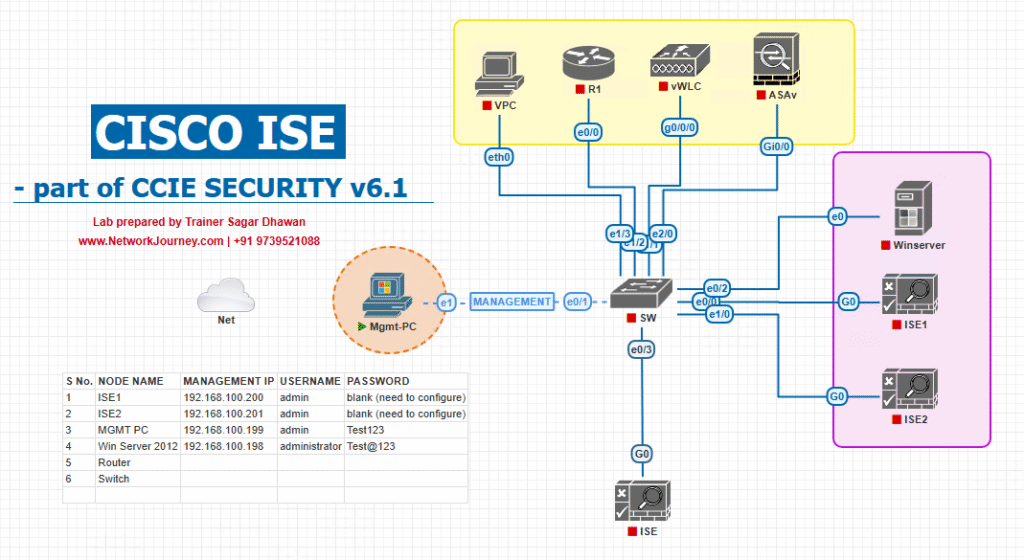
Pre-reqs: DNS/NTP; NAD registered as Network Device with shared secret; policy set that handles MAB and 802.1X; CoA enabled on NAD.
Step-by-Step GUI Configuration Guide (with CLI + API runbooks)
Phase 0 — Health & Services (CLI quick checks)
ISE CLI
show clock
show ntp
show application status ise | include Application|Database|API|pxGrid
ping <NAD-IP> source <ISE-PSN-IP>
Switch CLI
show clock
show authentication sessions
show aaa servers
Phase 1 — Enable ERS + ERS Admin + Certs (GUI)
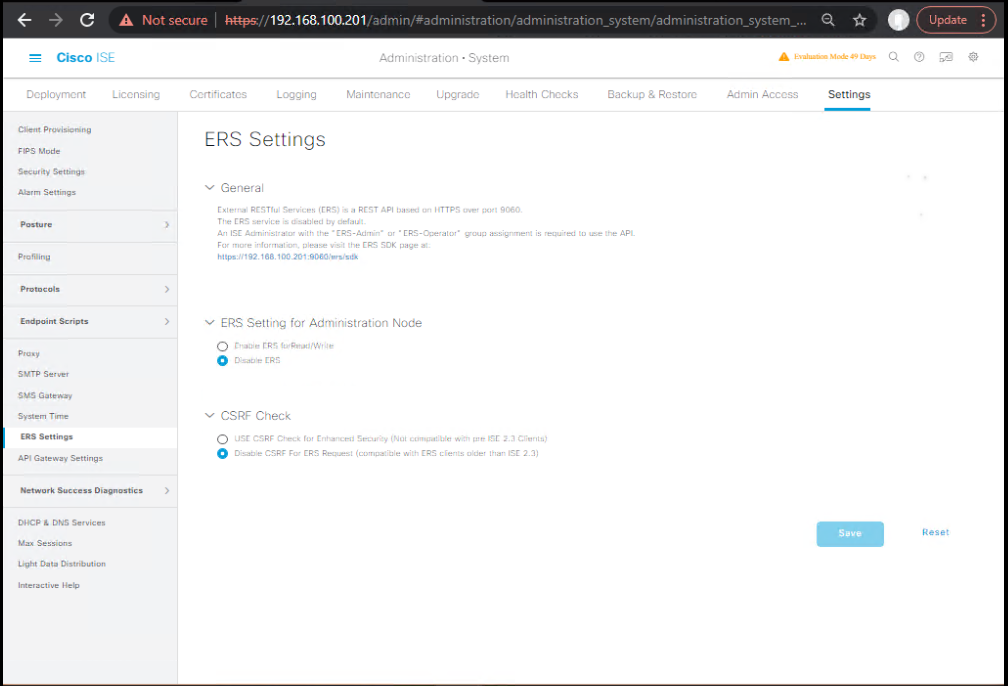
- Enable ERS
GUI: Administration → System → Settings → ERS Settings → Enable ERS for Read/Write → Save
[Screenshot: ISE ERS Settings – Enabled]
- Create ERS Admin
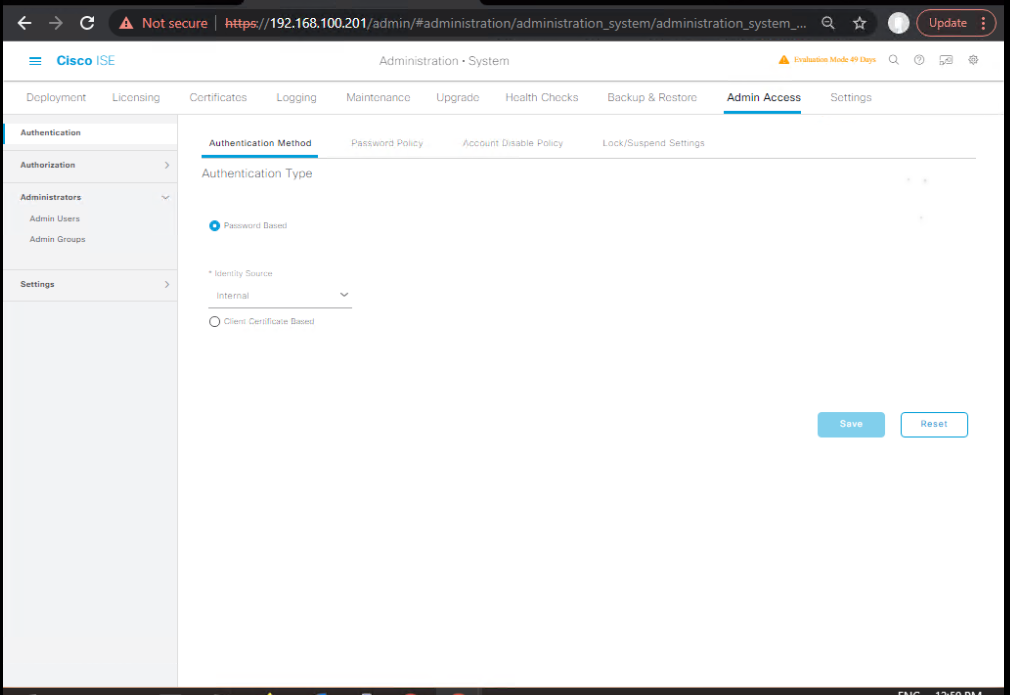
GUI: Administration → System → Admin Access → Administrators → Add- Username:
ers-endpoints-svc - Roles: ERS Admin (optionally MnT Read if using MnT API with same user)
- (Security) Restrict by IPs
[Screenshot: Admin with ERS Role]
- Username:
- Certificates
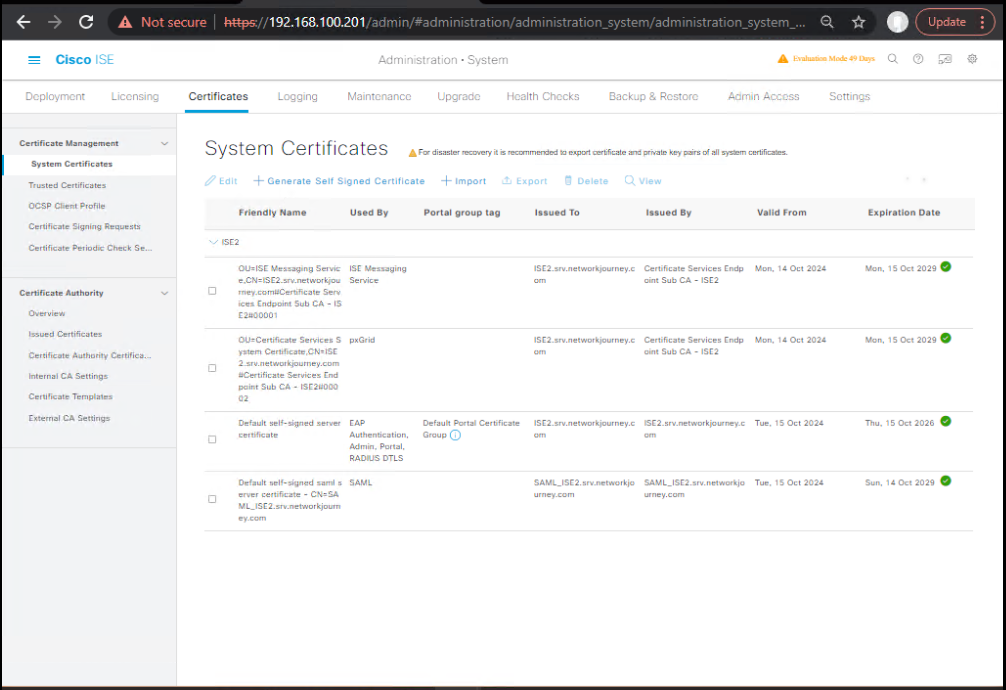
GUI: Administration → System → Certificates → System Certificates → HTTPS cert (CA-signed in prod)
[Screenshot: System Certificates]
- API sanity test
curl -k -u ers-endpoints-svc:'<pass>' \
  -H "Accept: application/json" \
  https://ISE-FQDN:9060/ers/config/version
Expect 200 + version.
Phase 2 — Build Endpoint Identity Groups (GUI)
- Create Endpoint Groups
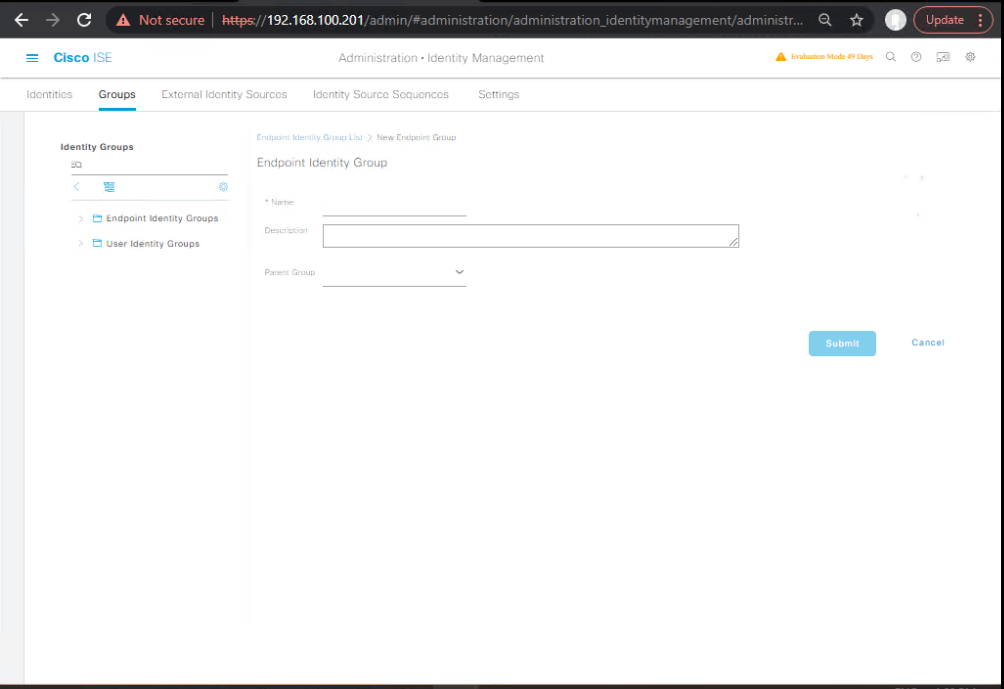
GUI: Administration → Identity Management → Groups → Endpoint Identity Groups → AddPrintersIoT-SensorsBYOD-Unmanaged
[Screenshot: Endpoint Identity Groups]
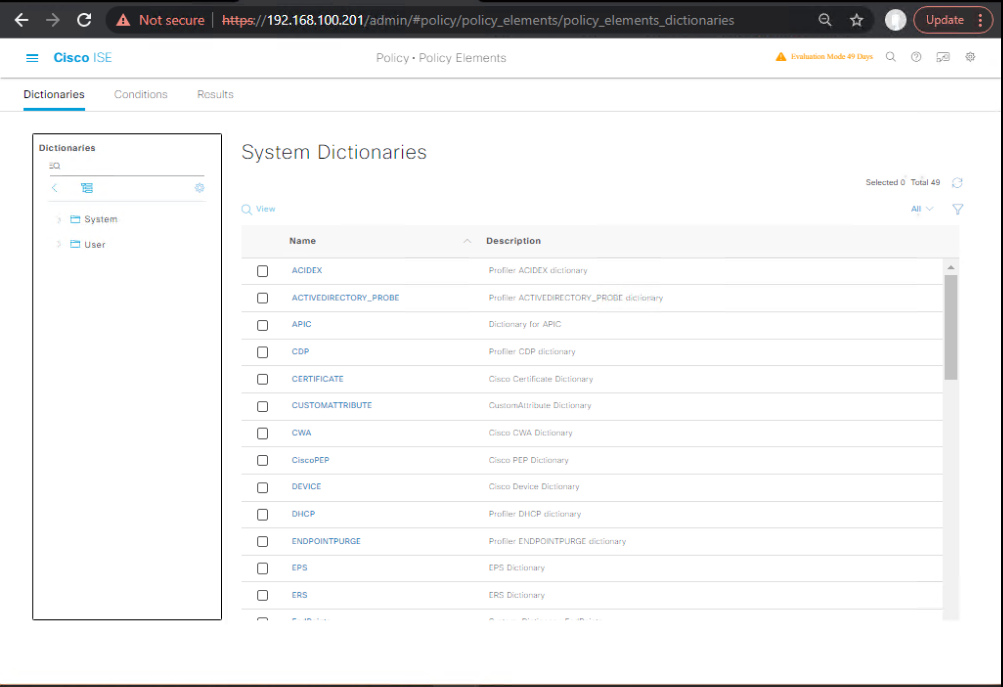
- (Optional) Custom Dictionary attributes for policy
GUI: Policy → Policy Elements → Conditions → Dictionaries (optional; we’ll also use endpoint customAttributes directly).
[Screenshot: Dictionaries/Attributes]
Phase 3 — Authorization policy path for MAB/802.1X (GUI)
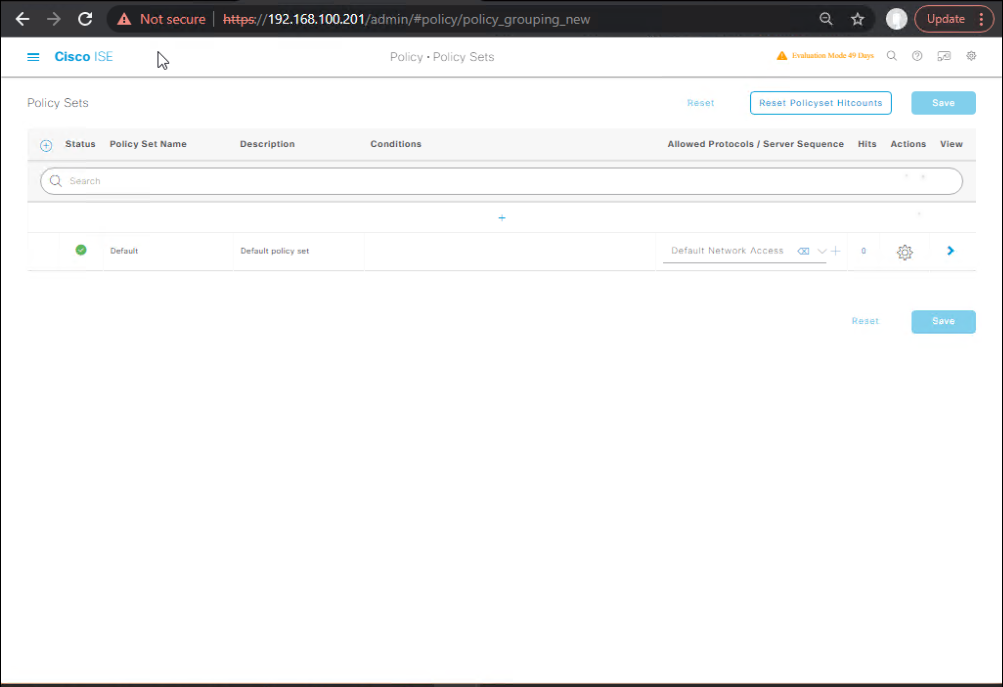
- Policy Set
GUI: Policy → Policy Sets →- Allowed Protocols include MAB (PAP/ASCII) and EAP (PEAP/EAP-MSCHAPv2)
- AuthC: Use Internal Endpoints for MAB (and Internal Users/AD for 802.1X)
[Screenshot: Policy Set – Allowed Protocols]
- AuthZ rules (examples)
- If
EndpointGroup == Printers→ VLAN 30 + DACLPrinter-Access - If
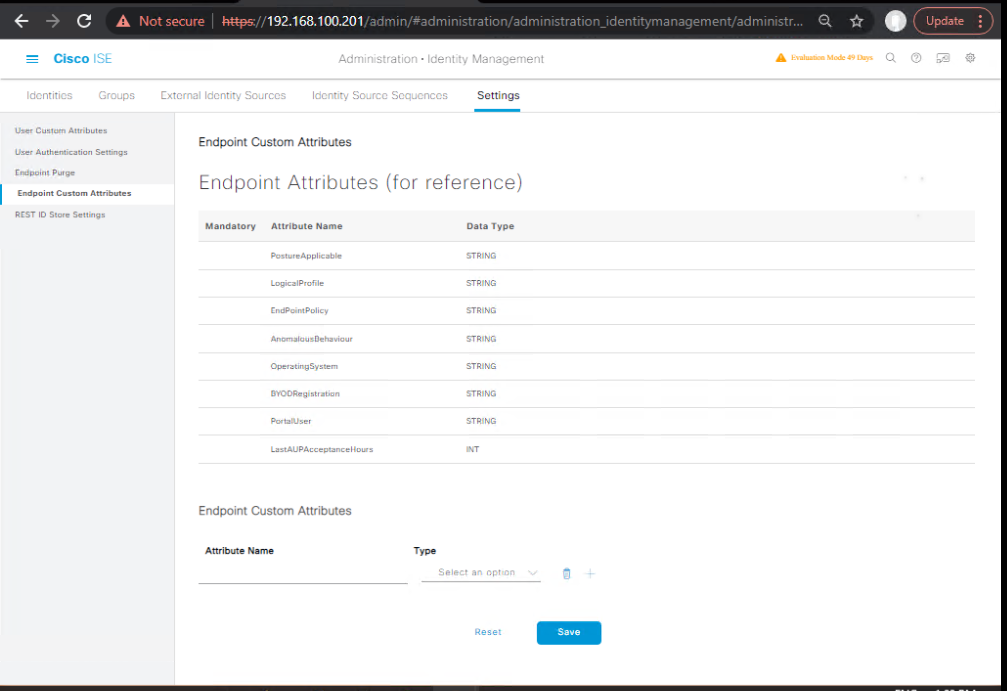
Endpoint:customAttributes Owner = Facilities→ add ACL permits
[Screenshot: Authorization Rules referencing EndpointGroup + CustomAttribute]
- If
Phase 4 — Endpoint CRUD via ERS (Postman/cURL)
Headers:
Accept: application/jsonandContent-Type: application/json
Base:https://ISE-FQDN:9060/ers
4.1 Create Endpoint (static group + custom attributes)
POST /config/endpoint
Body (JSON) (golden minimal + extras):
{
  "ERSEndPoint": {
    "name": "PRN-FLR3-HP4050",
    "mac": "00:11:22:33:44:55",
    "description": "HP Printer Floor3",
    "staticGroupAssignment": true,
    "groupId": "ENDPOINT_GROUP_ID_PRINTERS",
    "customAttributes": {
      "location": "BLD-A-FLR3",
      "owner": "Facilities",
      "assetTag": "PRN-04050"
    }
  }
}
Tip: Get groupId via GET /config/endpointgroup and pick the id of Printers.
cURL
curl -k -u ers-endpoints-svc:'<pass>' \
 -H "Accept: application/json" -H "Content-Type: application/json" \
 -d @endpoint_printer.json \
 https://ISE-FQDN:9060/ers/config/endpoint
Expect: 201 Created + Location header (endpoint ID)
Validate (GUI):
Administration → Identity Management → Identities → Endpoints → search MAC
[Screenshot: Endpoint present with Group=Printers + customAttributes]
Validate (CLI):
- Switch (after port activity / MAB trigger)
show authentication sessions interface Gi1/0/10 details
show mac address-table | include 0011.2233.4455
- ISE Live Logs: Operations → RADIUS → Live Logs (MAB attempts)
4.2 Read/Search Endpoints
- GET all (paged):
/config/endpoint - GET by ID:
/config/endpoint/{id} - GET by MAC:
/config/endpoint/mac/00:11:22:33:44:55(handy for lookups)
cURL example:
curl -k -u ers-endpoints-svc:'<pass>' \
 -H "Accept: application/json" \
 https://ISE-FQDN:9060/ers/config/endpoint/mac/00:11:22:33:44:55
4.3 Update Endpoint (move group, edit attributes)
PUT /config/endpoint/{id}
Body (JSON):
{
  "ERSEndPoint": {
    "name": "PRN-FLR3-HP4050",
    "description": "HP Printer Floor3 - moved to Floor4",
    "staticGroupAssignment": true,
    "groupId": "ENDPOINT_GROUP_ID_PRINTERS",
    "customAttributes": {
      "location": "BLD-A-FLR4",
      "owner": "Facilities",
      "assetTag": "PRN-04050"
    }
  }
}
Validate: GUI shows updated description/location; next reauth will reapply new policy.
4.4 Delete Endpoint
DELETE /config/endpoint/{id} → expect 204 No Content.
Validate: GUI endpoint gone; NAD sessions eventually clear (or manually disconnect).
Phase 5 — Endpoint Group APIs (create, read, map IDs)
Create group (optional)
POST /config/endpointgroup
{
  "EndPointGroup": {
    "name": "IoT-Sensors",
    "description": "All IoT sensors (MAB)",
    "systemDefined": false
  }
}
List groups → GET /config/endpointgroup (capture IDs for groupId in endpoints).
[Screenshot: Endpoint Group list]
Phase 6 — Session Controls (Reauth/Disconnect) & ANC
6.1 Force Reauthentication (apply new policy immediately)
Reauth by MAC
PUT /config/session/MACADDRESS/reAuth
curl -k -u ers-endpoints-svc:'<pass>' \
 -X PUT https://ISE-FQDN:9060/ers/config/session/00:11:22:33:44:55/reAuth
Validate (Switch):
show authentication sessions interface Gi1/0/10
State should flap/re-authorize; Live Logs show new hit.
6.2 Disconnect Session (bounce)
PUT /config/session/MACADDRESS/disconnect
Useful when moving VLANs/DACLs.
6.3 ANC Quarantine / Clear
Create ANC policy (once)
POST /config/ancpolicy
{"AncPolicy": {"name": "Quarantine", "actions": ["QUARANTINE"]}}
Apply to MAC
POST /config/ancendpoint/apply
{
  "OperationAdditionalData": {
    "additionalData": [
      {"name":"macAddress","value":"00:11:22:33:44:55"},
      {"name":"policyName","value":"Quarantine"}
    ]
  }
}
Clear ANC
POST /config/ancendpoint/clear
{
  "OperationAdditionalData": {
    "additionalData": [
      {"name":"macAddress","value":"00:11:22:33:44:55"}
    ]
  }
}
Validate:
- GUI: Operations → ANC Policy → Endpoint shows applied policy
- Switch CLI:
show authentication sessions(DACL/VLAN may change) - Live Logs: new AuthZ with Quarantine result / DACL
Phase 7 — Bulk Endpoint Import (CSV → Python)
CSV (endpoints.csv)
mac,name,description,groupName,location,owner,assetTag
00:11:22:33:44:55,PRN-FLR3-HP4050,HP Printer Floor 3,Printers,BLD-A-FLR3,Facilities,PRN-04050
00:aa:bb:cc:dd:ee,IoT-Temp-01,Temp Sensor,IoT-Sensors,BLD-B-FLR2,OT,TS-0001
Python (create-or-update idempotent)
import csv, requests, sys, time

ISE="https://ISE-FQDN:9060/ers"
AUTH=("ers-endpoints-svc","<password>")
H={"Accept":"application/json","Content-Type":"application/json"}
VERIFY=False  # set CA bundle in production

def groups_by_name():
    r=requests.get(f"{ISE}/config/endpointgroup",auth=AUTH,headers=H,verify=VERIFY)
    r.raise_for_status()
    out={}
    for g in r.json().get("SearchResult",{}).get("resources",[]):
        gd=requests.get(g["link"]["href"],auth=AUTH,headers=H,verify=VERIFY).json()
        eg=gd["EndPointGroup"]
        out[eg["name"]]=eg["id"]
    return out

def get_ep_by_mac(mac):
    r=requests.get(f"{ISE}/config/endpoint/mac/{mac}",auth=AUTH,headers=H,verify=VERIFY)
    return r.json() if r.status_code==200 else None

def create_ep(mac,name,desc,groupId,attrs):
    body={"ERSEndPoint":{
        "name":name,"mac":mac,"description":desc,
        "staticGroupAssignment": True,"groupId":groupId,"customAttributes":attrs}}
    r=requests.post(f"{ISE}/config/endpoint",json=body,auth=AUTH,headers=H,verify=VERIFY)
    return r.status_code, r.text

def update_ep(eid,name,desc,groupId,attrs):
    body={"ERSEndPoint":{
        "name":name,"description":desc,
        "staticGroupAssignment": True,"groupId":groupId,"customAttributes":attrs}}
    r=requests.put(f"{ISE}/config/endpoint/{eid}",json=body,auth=AUTH,headers=H,verify=VERIFY)
    return r.status_code, r.text

grp=groups_by_name()

with open("endpoints.csv") as f:
    for row in csv.DictReader(f):
        mac=row["mac"].lower()
        name=row["name"]; desc=row["description"]
        gname=row["groupName"]; gid=grp.get(gname)
        if not gid:
            print(f"[ERROR] Group '{gname}' not found for {mac}")
            continue
        attrs={"location":row["location"],"owner":row["owner"],"assetTag":row["assetTag"]}
        existing=get_ep_by_mac(mac)
        if existing:
            eid=existing["ERSEndPoint"]["id"]
            code,txt=update_ep(eid,name,desc,gid,attrs)
            print(f"[UPDATE {code}] {mac} -> {gname} :: {txt[:120]}")
        else:
            code,txt=create_ep(mac,name,desc,gid,attrs)
            print(f"[CREATE {code}] {mac} -> {gname} :: {txt[:120]}")
        time.sleep(0.2)  # gentle throttle
Validate:
- GUI: Endpoints list reflects imports, correct groups & attributes
- Switch/WLC: sessions match expected AuthZ when devices connect
- Live Logs: MAB/802.1X hits show group-based policy
Phase 8 — Posture & MnT Validation (optional but powerful)
MnT active sessions (XML typical)
curl -k -u ers-endpoints-svc:'<pass>' \
 "https://ISE-FQDN/admin/API/mnt/Session/MACAddress/00:11:22:33:44:55"
Parse IP, NAD, AuthC/AuthZ results; confirm after reauth/ANC.
Phase 9 — Break & Fix Drills (common errors)
- 401/403 → ERS disabled / wrong role / IP restriction → fix ERS settings & admin role
- 400 Bad Request → JSON wrapper
ERSEndPointmissing, wrong field, bad MAC format, or invalidgroupId - 409 Conflict → endpoint already exists (same MAC) → switch to PUT update
- 422 → referenced
groupIdnot found → enumerate groups and pick correct ID - Reauth has no effect → NAD CoA not enabled or device not authenticated → fix NAD config and re-test
- ANC applied but traffic not blocked → AuthZ rule doesn’t account for ANC policy / DACL mapping → verify policy path & DACL
Troubleshooting (Endpoint Automation via ERS/MnT/ANC/Session APIs)
0) Rapid Triage (60-second path)
- ERS on & auth works?
curl -k -u ers-endpoints-svc:'<pass>' -H "Accept: application/json" \ https://ISE:9060/ers/config/version- 200 → proceed
- 401/403/404 → §1A–1C
- Endpoint CRUD test (create minimal)
- POST
/ers/config/endpointwith golden body (§2B). - 201 + Location → proceed
- 400/409/415/422 → §2
- POST
- Group mapping valid?
- GET
/ers/config/endpointgroupand confirmgroupId→ §3.
- GET
- Policy applies? Trigger session reauth
- PUT
/ers/config/session/<MAC>/reAuth→ check Live Logs + switchshow auth sess→ §4.
- PUT
- ANC quarantine works?
- POST
/ers/config/ancendpoint/apply→ check GUI Operations → Adaptive Network Control → §5.
- POST
1) Access, Certificates, Service State
1A) 404 Not Found on ERS endpoints
- Likely: ERS disabled.
- Fix: GUI → Administration → System → Settings → ERS Settings → Enable ERS for Read/Write → Save.
- Re-test: GET
/ers/config/version.
1B) 401 Unauthorized / 403 Forbidden
- Likely: wrong creds/role or IP restriction.
- Fixes:
- Admin user has ERS Admin role (and MnT Read if needed).
- Remove/adjust Allowed IPs restriction.
- Check account not disabled/locked.
- Re-test: GET
/ers/config/version.
1C) TLS / Cert chain errors (Postman/Python)
- Lab: allow insecure (
-k, Postman “SSL verification off”,verify=False). - Prod: install CA-signed HTTPS cert on ISE; trust CA on client.
1D) ISE services down / slow
show application status ise | include (Application|Database|API|pxGrid|M&T)
- Restart in lab if stuck:
application stop ise ; application start ise(last resort; not in prod).
2) Endpoint CRUD – Payload & Schema Errors
2A) 415 Unsupported Media Type
- Cause: missing/incorrect
Content-Type. - Fix: set headers:
Accept: application/jsonContent-Type: application/json
2B) 400 Bad Request (golden minimal)
Use this exact body first; then add fields later:
{
  "ERSEndPoint": {
    "name": "PRN-FLR3-HP4050",
    "mac": "00:11:22:33:44:55",
    "staticGroupAssignment": false
  }
}
Common mistakes & fixes
- Missing ERSEndPoint wrapper → add it.
- Invalid MAC format (bad chars/length) → use
00:11:22:33:44:55. - Unknown fields (e.g.,
identityGroups) → remove; endpoint uses groupId (single). - JSON trailing commas → remove.
2C) 409 Conflict (endpoint exists)
- Cause: same MAC already present.
- Fix path:
GET /ers/config/endpoint/mac/<MAC>→ grabid.PUT /ers/config/endpoint/{id}to update (group/attributes).- If replacing record →
DELETEthenPOST(rarely needed).
2D) 422 Unprocessable Entity (invalid reference)
- Cause: bad
groupId. - Fix: enumerate groups:
curl -k -u ers-endpoints-svc:'<pass>' -H "Accept: application/json" \ https://ISE:9060/ers/config/endpointgroupThen GET eachlink.href, copy exactid.
2E) Pagination surprises (listing endpoints)
- Symptom: only a subset of endpoints returned.
- Fix: follow
SearchResult.nextPage.hrefor HTTPLinkheader until no more pages.
3) Endpoint Group Mapping & Custom Attributes
3A) Group exists in GUI but API rejects groupId
- Cause: using name instead of id.
- Fix: resolve ID via GET and use that ID in endpoint body.
3B) Custom attributes not visible in GUI
- Cause: wrong JSON object nesting or name collision.
- Correct body snippet:
"customAttributes": {
  "location": "BLD-A-FLR3",
  "owner": "Facilities",
  "assetTag": "PRN-04050"
}
- Validate: open endpoint in GUI → Custom Attributes tab.
4) Session Control (ReAuth/Disconnect) & Policy Re-application
4A) ReAuth returns 200 but policy unchanged
- Causes/Fixes:
- Device not currently authenticated → no active session to reauth. Check:
- Switch:
show authentication sessions interface Gi1/0/x details
- Switch:
- CoA not enabled on NAD → enable & verify.
- Wrong MAC (dash vs colon) → get session MAC from switch output and reuse exact format.
- Device not currently authenticated → no active session to reauth. Check:
- Validate effect:
- ISE Live Logs: new hit with updated authorization rule.
- Switch: DACL/VLAN update visible in
show authentication sessions.
4B) Disconnect call works but endpoint reconnects with old policy
- Cause: endpoint cached (sticky) or policy didn’t change.
- Fix: confirm endpoint group/attributes changed before reauth; confirm AuthZ rule references those values.
5) ANC (Adaptive Network Control) Troubles
5A) Apply ANC returns OK but traffic not blocked
- Root causes:
- ANC policy exists but AuthZ rules don’t honor ANC state (e.g., no Quarantine DACL mapping).
- CoA not supported on NAD/WLAN.
- Fixes:
- Create/verify ANC policy (
Quarantine) and ensure your policy set has result that enforces the Quarantine DACL when ANC is active. - Verify NAD CoA.
- Create/verify ANC policy (
- Validation:
- GUI: Operations → Adaptive Network Control (endpoint listed).
- Switch:
show authentication sessions(new DACL), orshow ip access-listshits.
5B) Clear ANC but endpoint stays blocked
- Cause: session still bound to quarantine authz.
- Fix: call ReAuth or Disconnect after clearing ANC; verify Live Logs reauthorization.
6) MnT & Live Logs – “Proof of Fix”
6A) No Live Logs for MAB/802.1X
- Cause: NAD not added or wrong shared secret.
- Fix:
- GUI: Network Devices → verify device IP/secret.
- Switch:
test aaa group radius(for quick signal).
6B) Live Log shows “Unknown NAS” / “User not found”
- Unknown NAS: fix NAD object in ISE.
- User not found: for MAB, ensure Internal Endpoints lookup is used in AuthC; endpoint record exists.
6C) Pull active session (MnT API)
curl -k -u ers-endpoints-svc:'<pass>' \
 "https://ISE/admin/API/mnt/Session/MACAddress/00:11:22:33:44:55"
- Validate current NAD, IP, AuthZ profile, DACL name.
7) Postman Runner & Python – Typical Breakages
7A) Postman “Could not get any response”
- SSL verify failure → turn off in lab (Settings); in prod install CA chain.
- Wrong port/FQDN → use
https://<ISE>:9060/ers.
7B) Python SSLError / ReadTimeout
- Add
verify=False(lab) or CA bundle; usetimeout=10. - Reuse
requests.Session(); add retry/backoff for bulk.
7C) Bulk import partial failures
- Pattern: 201 for some, 409/422 for others.
- Fix: idempotent flow:
- GET by MAC → exists? PUT; else POST.
- Log errors per row to
errors.csvand continue. - Throttle ~5–10 req/s per node.
8) Switch/WLC CLI – What to Check
Catalyst (wired)
show authentication sessions interface Gi1/0/10 details
show running-config | section radius|aaa
show cts interface Gi1/0/10  (if TrustSec used)
debug authentication all
WLC 9800 (wireless)
show wireless client mac 0011.2233.4455 detail
show aaa servers
show logging | inc radius|coa
You want to see:
- Session Authorized; AuthZ rule name; DACL/VLAN correct; Reauths counted after API triggers.
9) Example Error Payloads (recognize fast)
ERS 400 – bad field
{"ERSResponse":{"messages":[{"title":"Invalid request body: unknown field 'identityGroups'","type":"ERROR","code":"invalid"}]}}
ERS 409 – duplicate MAC
{"ERSResponse":{"messages":[{"title":"Duplicate resource: endpoint already exists","type":"ERROR","code":"duplicate"}]}}
ERS 422 – bad groupId
{"ERSResponse":{"messages":[{"title":"Reference not found: endpointgroup id","type":"ERROR","code":"invalid-reference"}]}}
ANC apply OK
{"OperationResult":{"result":"SUCCESS","resultValue":"Successfully applied ANC policy"}}
10) Decision Trees
Create/Update endpoint
- 415 → set headers.
- 400 → wrapper/fields/MAC → use golden minimal body.
- 409 → switch to PUT.
- 422 → wrong groupId → list groups & use correct ID.
- 2xx but no policy change → run ReAuth → verify Live Logs.
ANC path
- Apply → no block → check DACL mapping + CoA.
- Clear → still blocked → ReAuth/Disconnect, confirm Live Logs.
11) Governance & Safety (prod)
- Least-privilege ERS user; IP restrict.
- Rotate credentials; store in secret manager.
- CA-signed certs; no
-kin prod. - Log to SIEM: ERS Audit + RADIUS + ANC actions (who/what/when).
12) Ready-to-Paste “Golden” Calls
Create endpoint (minimal)
curl -k -u ers-endpoints-svc:'<pass>' -H "Accept: application/json" -H "Content-Type: application/json" \
-d '{"ERSEndPoint":{"name":"EP-01","mac":"00:11:22:33:44:55","staticGroupAssignment":false}}' \
https://ISE:9060/ers/config/endpoint
Move endpoint to group + attributes (PUT)
curl -k -u ers-endpoints-svc:'<pass>' -H "Accept: application/json" -H "Content-Type: application/json" \
-X PUT -d '{"ERSEndPoint":{"name":"EP-01","description":"moved","staticGroupAssignment":true,"groupId":"<GROUP-ID>","customAttributes":{"location":"BLD-A","owner":"OT"}}}' \
https://ISE:9060/ers/config/endpoint/<ENDPOINT-ID>
ReAuth session
curl -k -u ers-endpoints-svc:'<pass>' -X PUT https://ISE:9060/ers/config/session/00:11:22:33:44:55/reAuth
ANC apply / clear
curl -k -u ers-endpoints-svc:'<pass>' -H "Content-Type: application/json" \
-d '{"OperationAdditionalData":{"additionalData":[{"name":"macAddress","value":"00:11:22:33:44:55"},{"name":"policyName","value":"Quarantine"}]}}' \
https://ISE:9060/ers/config/ancendpoint/apply

curl -k -u ers-endpoints-svc:'<pass>' -H "Content-Type: application/json" \
-d '{"OperationAdditionalData":{"additionalData":[{"name":"macAddress","value":"00:11:22:33:44:55"}]}}' \
https://ISE:9060/ers/config/ancendpoint/clear
13) Cleanup & Forensics
- Export Operations → Audit (CSV) after runs.
- Remove lab endpoints you created (DELETE) to keep DB clean.
- Clear ANC policies from lab endpoints.
- Re-enable SSL verification in Postman/Python.
- Capture before/after policy screenshots for your lab journal.
FAQs – Automating Endpoint Management via Cisco ISE APIs
FAQ 1. Why should I automate endpoint management in ISE instead of using the GUI?
- Answer: The GUI is fine for ad-hoc tasks, but it does not scale. In large environments, thousands of devices (printers, IoT, BYOD, contractors) are added/removed daily. APIs enable bulk import, near-real-time updates, integration with CMDB/asset inventory, and closed-loop remediation (e.g., auto-quarantine via SOC tools). Automation reduces human error and enforces consistency across policy sets.
FAQ 2. Which APIs in ISE are relevant for endpoint automation?
- Answer:
- ERS (External RESTful Services): CRUD operations for endpoints, groups, ANC policies.
- MnT (Monitoring & Troubleshooting API): Pull live session info, RADIUS logs, posture results.
- Session APIs: Trigger CoA (ReAuth/Disconnect).
- ANC APIs: Apply/Clear quarantine policies dynamically.
- pxGrid: Context sharing with other security tools (Splunk, Firewalls, EDR).
Each serves a piece of the automation lifecycle: create → assign → enforce → monitor → remediate.
FAQ 3. What are the prerequisites before calling ISE APIs?
- Answer:
- Enable ERS (Admin → System → Settings → ERS Settings).
- Create a dedicated ERS Admin account (least privilege).
- Confirm CoA enabled on NADs (switches/WLCs).
- Have ISE certificate trusted by client (or allow insecure in lab only).
- Know port numbers: ERS = 9060/9061, MnT = 443.
Without these, API calls will fail with 401/403/404 or TLS errors.
FAQ 4. How do I create a new endpoint using the API?
- Answer:
UsePOST /ers/config/endpointwith JSON body:{ "ERSEndPoint": { "name": "PRN-FLR3-HP4050", "mac": "00:11:22:33:44:55", "staticGroupAssignment": false } }- 201 Created → success (Location header contains endpoint ID).
- Common errors: 400 (bad JSON), 409 (duplicate MAC), 422 (invalid groupId).
Always test with a minimal body first, then add custom attributes.
FAQ 5. How do I assign endpoints to specific groups or profiles?
- Answer:
- Endpoint groups have unique IDs, not just names.
- Run
GET /ers/config/endpointgroup→ copyid. - Update endpoint with
PUT /ers/config/endpoint/{id}and include:
"groupId": "<group-uuid>"- Verify in GUI: Endpoints → Group Assignment.
Without correct groupId, policy rules won’t match.
FAQ 6. How do I enforce policy changes immediately on an endpoint?
- Answer: After updating an endpoint, trigger re-evaluation:
PUT /ers/config/session/<MAC>/reAuth→ forces CoA (reauth).PUT /ers/config/session/<MAC>/disconnect→ fully drops the session.- Confirm via ISE Live Logs or switch:
show authentication sessions interface Gi1/0/10 details
FAQ 7. What is ANC and how is it used with automation?
- Answer:
ANC = Adaptive Network Control. It lets ISE dynamically quarantine or restrict endpoints.POST /ers/config/ancendpoint/apply→ apply ANC policy (e.g., Quarantine).POST /ers/config/ancendpoint/clear→ remove.
Use cases: SOC detects malware → triggers ANC API → endpoint forced into quarantine VLAN/DACL.
It’s the fastest API-driven enforcement mechanism.
FAQ 8. How can I monitor if my automation worked correctly?
- Answer:
- ISE MnT API: Query sessions/logs by MAC/IP/User.
- Live Logs GUI: Verify new auth with updated policy hit.
- NAD CLI: Check applied DACL/VLAN (
show auth sess). - Audit logs: Track ERS actions (who/what/when).
Always validate in 3 planes: API return code, ISE Live Logs, and NAD CLI.
FAQ 9. What are the most common errors engineers hit with ERS APIs?
- Answer:
- 401 Unauthorized / 403 Forbidden: bad creds or ERS not enabled.
- 415 Unsupported Media Type: missing
Content-Type: application/json. - 400 Bad Request: wrong JSON wrapper (must use
"ERSEndPoint"). - 409 Conflict: endpoint already exists.
- 422 Unprocessable Entity: invalid groupId reference.
- Timeouts: large bulk requests → throttle or batch.
Each error is predictable if you check response body codes.
FAQ 10. How do I safely use ISE APIs in production?
- Answer:
- Use service accounts with least privilege.
- Enforce IP restrictions for API clients.
- CA-signed certs (never
-kin prod). - Log all API changes to SIEM for auditing.
- Batch imports to avoid overwhelming ISE.
- Always test in lab/staging before production push.
Governance is as important as the automation itself.
YouTube Link
For more in-depth Cisco ISE Mastery Training, subscribe to my YouTube channel Network Journey and join my instructor-led classes for hands-on, real-world ISE experience
Closing Notes
- Treat endpoint onboarding as code: CSV → API → logs → verify.
- Custom Attributes are policy superpowers—encode owner/site/asset in the endpoint object.
- Use ReAuth/Disconnect to enforce instantly and ANC for incident response.
- Always prove: ISE Live Logs, MnT session, NAD/WLC CLI—don’t assume.
Upgrade Your Skills – Start Today
“For more in-depth Cisco ISE Mastery Training, subscribe to my YouTube channel Network Journey and join my instructor-led classes.”
Fast-Track to Cisco ISE Mastery Pro — 4-month live cohort:
- Real-world labs: ERS, MnT, pxGrid, ANC, TrustSec, Posture, Wired/Wireless
- Automation packs: Endpoint/User/ANC/Session APIs + Playbooks
- Troubleshooting bibles with log samples & fixes
Enroll / syllabus: https://course.networkjourney.com/ccie-security/
Enroll Now & Future‑Proof Your Career
Email: info@networkjourney.com
WhatsApp / Call: +91 97395 21088

![[Day 121] Cisco ISE Mastery Training: Automated Guest User Creation via API](https://networkjourney.com/wp-content/uploads/2025/08/Day-121-Cisco-ISE-Mastery-Training-Automated-Guest-User-Creation-via-API.png)